




Trade
Overview
TT Platform
Browser Access
TT Desktop
Workspace Windows
Widgets
Preferences
Viewing Market Data
Time and Sales
Depth
Market Grid
Product Grid
Spread Matrix
Basic Order Entry
TT Order Types
TT Premium Order Types
Order Ticket
MD Trader®
Order Profiles
Routing Rules
Blocktrader
Trading Crypto on TT
Order Management
Order Book
Floating Order Book
Fills
Positions
Orders and Fills
Audit Trail
Audit Query
Account List
Position Manager
Alert Manager and Alert Viewer
Account & User Restrictions
Balances
TT® OMS
Care Orders
Lock and Release
Bulking
Stitching and Splitting
Combining
Order Passing
Order Exceptions
Options
Options on TT
Options Chain
Options Trade Monitor
Vol Curve Manager
Electronic Eye
RFQ Viewer
RFQ with Counterparties
Counterparty Manager
Strategy Creation
Options Risk
Options Risk Matrix
Watchlist
Expiration Manager
Volatility Calculator
TT Uncovered 2.0
TT Uncovered 3.0
QuikStrike
TT Uncovered
Spread Trading
Autospreader
Autospreader Rules
Hedge Manager
Trading in Yield
Aggregator
Algo Trading
Algo Dashboard
Template Manager
Autotrader
Excel integration with TT
Analytics
Charts
Trader Analytics
Data and Analytics
TT Margin
ADL
ADL Overview
Introduction to ADL
ADL Basic Concepts
Building your first algo
Advanced concepts
Setup
Setup Overview
Getting Started
Company Administration
Connections
Accounts
Users
Company
Order Tag Defaults
Account Administrators
TT Premium Services
TT Access
Advanced Features
Risk Management
Risk Administration
Risk Limits
Pre-Trade Portfolio Risk
Order Cross Prevention
KRM Limits
TT® OMS
TT OMS Administration
Exchanges: Americas
B3
CBOE
Cboe FX
CFE
CME
Dealerweb
EBS Direct
EBS Market
Fenics
FMX
FMX_USTF
Goldman Sachs Commodity Blocks (GSCB)
ICE
MexDer
MIAX_FUT_CH
MIAX_FUT_NY
MX
Nodal
NFI
Exchanges: EMEA
ATHEX
BIST
CEDX
DGCX
EEX
EPEX SPOT
Eris
Eurex
Euronext
GFO-X
ICE_L
JSE
LME
LME NTP
LSE
MEFF
NDAQ_EU
NASDAQ_NED
Nord Pool
WSE
Exchanges: Asia/Pacific
ABX
ASX
FEX
HKEx
JPX
NSE
NZX
SGX
SGX GIFT
TAIFEX
TFEX
TFX
CoinFLEX
Exchanges: Crypto
Coinbase
Kraken
FIX Support
FIX Ruleset
FIX Sessions
Secondary Accounts
Monitor
TT Mobile
TT Mobile on Android
TT Mobile on iOS
TT Backtesting
APIs
TT REST API 2.0
TT REST API 2.0 (UAT)
TT .NET SDK
Subscribing for market data
More about prices
Working with orders and fills
Working with Algos
Algo Server
TT CORE SDK
TT Trade Surveillance
Core Models
TT FIX Services
TT FIX General
TT FIX Order Routing
TT FIX Market Data
TT FIX Drop Copy Out
TT FIX Drop Copy In
TT FIX Gateway
TT FIX Recovery
MiFID II Support

Extranet Private Lines

On this page

This service provides you with the option to connect to the TT platform over a private, layer 3 extranet. The extranet is managed by third-party providers with experience delivering financial network services.

Note: When using TT direct connect or extranet private line access in addition to TT User Setup IP restrictions, please contact your TT Onboarding team member to ensure that all your potential TT source network address translations (NAT) Private IPs are added to your custom IP address restrictions permissions list.

The following diagram shows the scenario for connecting to a co-located TT data center through an extranet service provider.
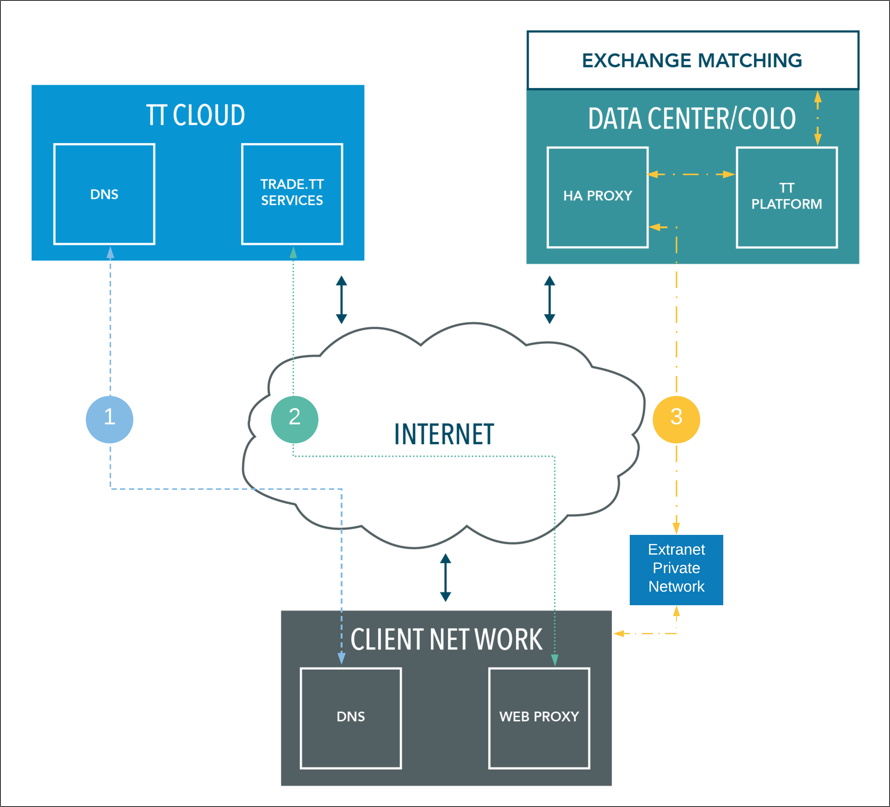
In this diagram:

  1. Through the Internet, a DNS lookup occurs for *trade.tt allowing the client browser to connect to *trade.tt on private AWS in TT Cloud.

  2. The connection to TT Cloud is established through the Internet from the client network’s Web Proxy and firewall and maintained for less latency-sensitive traffic. The Trade application, Setup application, and other available TT Cloud services are downloaded to the client’s browser.

    Note: A DNS and Internet connection are required for connecting to TT Cloud.

  3. In the user’s browser, the Trade application scans the access lines in Setup for a private line URL and determines that there is an unrestricted IP address available for an optimal route to a co-located TT data center via the extranet provider (e.g., BT Radianz).

  4. The Web Proxy is bypassed and the user’s browser connects directly to the HA Proxy load balancer and Edge Server in the TT data center via the extranet connection.

    Note: Use of a Web Proxy is not recommended for connecting to the TT data center via extranet private lines. If Web Proxy is rebooting during trading, then Traders will not see market data during the service outage. In addition, Web Proxies are not usually high performance and therefore add unnecessary latency for traders. You should use a Web Proxy Bypass when using private line access. This can be accomplished by placing the *cc.trade.tt web proxy bypass exception in your PAC file.

This site is registered on wpml.org as a development site. Switch to a production site key to remove this banner.