
Configuring client connectivity










FIX client security definition applications connect to TT FIX services through a FIX Market Data session.
Use the FIX sessions window to add FIX sessions to your company and configure them for third-party
FIX client access.
To add and configure a FIX Market Data session:
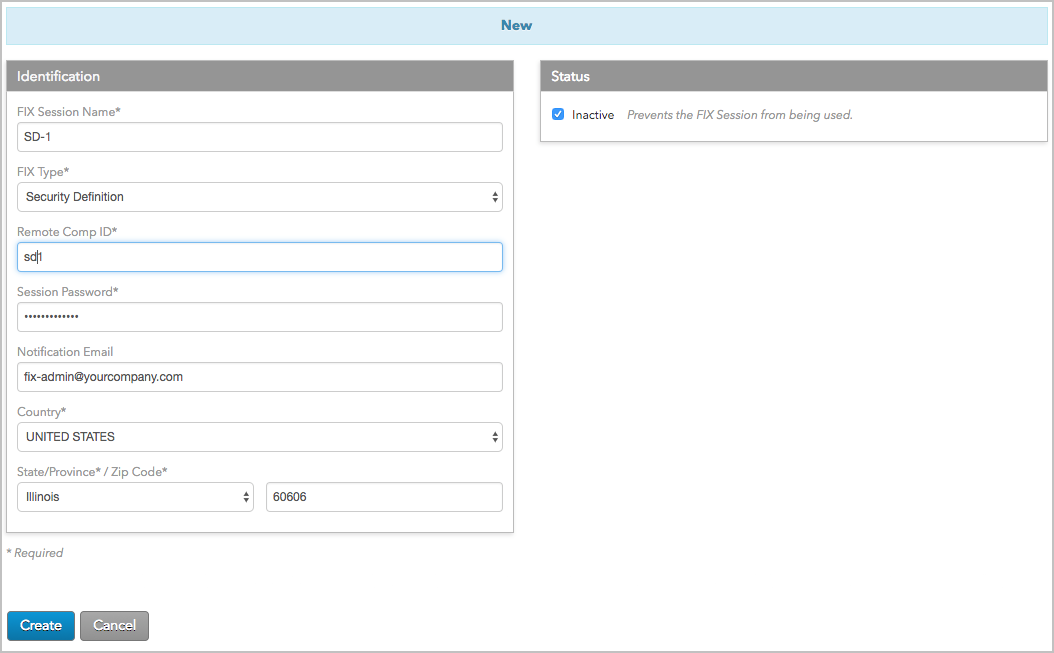
Notes:
If a value is specified for this setting:
Also, if FIX clients send Tag 57, which is optional, in the Logon (A) message, the value must be
supplied in this setting.
Based on the country selected, you may also need to provide a State/Province and Zip Code.
This allows the FIX Session to be configured for
trading (assigned accounts, connections, etc.) by the shared company.
TT FIX Security Definition / Market Data Service enables traders with FIX-based client applications to:
To begin creating an order routing client application using TT FIX, you will need to:
The TT FIX Market Data service delivers prices and order book data in real-time only. If a FIX Market Data session is interrupted during the trading day, market data updates that occurred while the FIX session was experiencing a disruption, or was disconnected, are not recoverable.
Potential causes of disruption in the price stream include, but aren’t limited to:
Defects in the Customer or TT FIX application
Network Outages at the TT, Customer, or intermediate site
Internet or Private Telco outages (where applicable)
Data Center outages at Customer or TT premises
Exchange Disaster Recovery
Customers who require capture of an unbroken stream of price updates are strongly encouraged to run redundant, live-live FIX Market Data Sessions to their primary TT Data Center, as well as having documented and tested plans to handle Disaster Recovery in the event of an extended outage at either the TT or customer data center.
FIX Sessions that connect to our General Pool of load-balanced FIX Market Data servers run in a multi-tenant environment. Customers who require high volume, high performance, greater control or more flexibility than are available via the General Pool servers are strongly encouraged to provision dedicated FIX Market Data servers for their own exclusive use. Details on dedicated servers and fees are available from the TT Onboarding team.
While TT does capture tick data internally for charting purposes, the historical data store for this data is not accessible via FIX or any other TT customer interface currently available. Requests for historical market data are handled as bespoke software projects that are chargeable at our current professional services rates for custom development, in addition to any applicable exchange fees. Contact your TT Account Manager or Onboarding representative for more information.
TT FIX Market Data client applications require a FIX session to be created in Setup in order to connect to TT FIX servers. Client applications should be designed with the following session management considerations in mind:
TT FIX Order Routing sessions are persistent by default and reset on Saturdays
at 22:00 UTC.
Clients may optionally define a custom daily reset time when configuring a FIX
Order Routing session in Setup Setup.
Note: If a FIX client remains connected
to a FIX session when either the default or custom scheduled reset time
occurs, TT’s FIX engine will send a Logout message.
By default, message sequence numbers for FIX sessions are reset when TT resets all FIX sessions. Message sequence numbers can also be reset, when desired, by setting Tag 34 (MsgSeqNum) = 1 and Tag 141 (ResetSeqNumFlag) = Y when sending a Logon (A) message.
TT FIX will ensure ClOrdID (tag 11) uniqueness for:
For more information, refer to the ClOrdID tag description in the New Order Single (D) message.
If your FIX client application disconnects and subsequently reconnects, TT’s
FIX engine will perform an internal recovery process to query our cloud based
order book database and will deliver all unsent execution reports by applying
an incremental sequence number that picks up where we left off prior to the
disconnect. The session recovery process can be considered complete in all
cases with a News message [35=B].
This eliminates the requirement for your FIX client application to detect a
gap on the session level and request missed execution reports while
disconnected. This also allows FIX client applications to failover seamlessly
into a different datacenter without sequence number consideration.
If your FIX client application disconnects and was unable to process
executions prior to the disconnect, TT’s FIX engine supports the standard
message replay mechanism specified by the FIX Protocol by honoring Resend
Request [2] messages received from FIX client applications.
In extreme cases where your FIX client application unexpectedly disconnected
and required intervention on your side to reset sequence numbers that resulted
in a subsequent Logon with 141=Y and 34=1, TT’s FIX engine will still perform
a session recovery process that will query our cloud based order book database
for executions marked as undelivered and apply an incremental sequence number
to each message message. In this case, Logon [34=1], missed executions [34=2,
3, etc]. The session recovery process can be considered complete in all cases
with a News message [35=B].
In the scenario where although TT delivered all relevant execution reports to
your FIX client application, your internal system may have experienced an
issue and was unable to process the messaging. TT’s FIX Engine is aware of
sent messages, but we are unaware of your application’s success or failure to
process them. If your FIX client application also required a sequence number
reset and cannot request a Resend Request [2] message, executions can be
retrieved through our REST API [link to REST].
The TT FIX service allows customers to receive real-time copies of all of their orders submitted through the TT platform, along with their corresponding fills. To use this service, customers must develop FIX clients capable of connecting to and communicating with the TT FIX.
TT FIX supports a subset of the FIX protocol (Version 4.2 with Errata 20010501 and Version 4.4) message types and tags within its message types. Refer to the website http://www.fixtradingcommunity.org/ for additional FIX tag descriptions and message definitions. Both production and UAT versions of the TT FIX schema are available for download at the following link:
https://library.tradingtechnologies.com/tt-fix/general/System_Overview.html#fix-schemas
The second line of each TT FIX schema file contains an XML comment that identifies the schema’s publication date and internal version information, similar to the following.
<!-- TT FIX Version: UAT 2025-08-01 Git:16bc4b86e3c94bef40c3dc55c5314c16df9c9930 MD5:998190c7d44e5636f42569d1279400ee -->