










For each algo that you wish to implement, you must create a file named ‘metadata.xml’ which defines the algo’s parameters and how they should be displayed in the TT user interface. This definition file must then be deployed to the TT environment so the TT user interface can find it.
This file must describe the algorithm, its parameters and its graphical layout using FIXatdl. The following is an introduction to a subset of the FIXatdl functionality most commonly used in TT Algo SDK algos. For complete details, see the official FIXatdl web site.
The metadata.xml file describes the algo with the following XML element hierarchy:
<?xml version="1.0" encoding="utf-8"?>
<Strategy>
  <Parameter> . . . </Parameter>
  . . .
  <Parameter> . . . </Parameter>
  <StrategyLayout>
  . . .
  </StrategyLayout>
</Strategy>
The basic structure of this file includes the following sections:
The TT Algo SDK software package includes the necessary FIXatdl schema files. They can be used to create a conforming FIXatdl document. The portions of the specification that are not supported by TT Algo SDK algos have been commented out.
Section: file header
The file header consists of the following:
<?xml version=”1.0″ encoding=”utf-8″?>
Section: algo name and description
The <Strategy> element’s xmlns attributes specify the basic information about the algo. In addition to the FixATDL namespaces and schema information, it includes algo-specific attributes.
<Strategy xmlns=”http://www.fixprotocol.org/FIXatdl-1-1/Core”
xmlns:val=”http://www.fixprotocol.org/FIXatdl-1-1/Validation”
xmlns:lay=”http://www.fixprotocol.org/FIXatdl-1-1/Layout”
xmlns:flow=”http://www.fixprotocol.org/FIXatdl-1-1/Flow”
xmlns:xsi=”http://www.w3.org/2001/XMLSchema-instance”
xsi:schemaLocation=”http://www.fixprotocol.org/FIXatdl-1-1/Core tt-fixatdl-core-1-1.xsd”
name=“MyAlgo” uiRep=“My Algo” version=“1.0.0” providerID=“TBD” entryFile=“myAlgo.so”
>
The <Strategy> element must specify the following algo-specific attributes:
-
name: Short name of the algo as displayed in the list of algos that a user has permission to launch

-
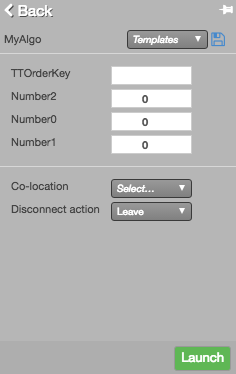
uiRep: Full name of the algo as displayed in the algo’s parameter pane
-
version: Developer-defined version of the algo
-
providerID: ID of the firm providing the algorithm
-
entryFile: Name of the algo’s shared object (.so) file
Section: algo parameter descriptions
Each input and output parameter must be defined with a separate <Parameter> element. The following code snippet shows several sample <Parameter> elements:
<Parameter name=”instr_id_1″ required=”true” dir=”In” updateable=”false” xsi:type=”String_t”/>
<Parameter name=”instr_acct_1″ required=”true” dir=”In” updateable=”false” xsi:type=”String_t”/>
<Parameter name=”order_price_1″ required=”true” dir=”In” updateable=”true” xsi:type=”Price_t”/>
<Parameter name=”order_qty_1″ required=”true” dir=”In” updateable=”true” xsi:type=”Qty_t”/>
The <Parameter> element requires the following attributes:
-
name: Name of the parameter
No two parameters of any strategy may have the same name. Names are case-sensitive and must begin with an alpha character followed only by alpha-numeric characters that must not contain whitespace characters. The value is not case-sensitive.
TT supports several special names which, when used, allow the user to launch the algo more quickly from MD Trader. These fields will be automatically populated with the corresponding values based on where the user clicks.
Parameter Name
Description
Values
__instr_id
Instrument ID
__order_quantity
Order Quantity
__account
Account
__side
Order Side
SIDE_BUY = 1
SIDE_SELL = 2
__price
Order price in decimal format
__tif
Time-In-Force
TIME_IN_FORCE_DAY = 1
TIME_IN_FORCE_GOOD_TILL_CANCEL = 2
TIME_IN_FORCE_AT_THE_OPENING = 3
TIME_IN_FORCE_IMMEDIATE_OR_CANCEL = 4
TIME_IN_FORCE_FILL_OR_KILL = 5
TIME_IN_FORCE_GOOD_TILL_CROSSING = 6
TIME_IN_FORCE_GOOD_TILL_DATE = 7
TIME_IN_FORCE_AT_THE_CLOSE = 8
TIME_IN_FORCE_GOOD_THROUGH_CROSSING = 9
TIME_IN_FORCE_AT_CROSSING = 10
TIME_IN_FORCE_AUCTION = 13
TIME_IN_FORCE_GOOD_IN_SESSION = 14
TIME_IN_FORCE_DAY_PLUS = 15
TIME_IN_FORCE_GOOD_TILL_CANCEL_PLUS = 16
TIME_IN_FORCE_GOOD_TILL_DATE_PLUS = 17
TIME_IN_FORCE_GOOD_TILL_TIME = 18
TIME_IN_FORCE_CLOSING_PRICE_CROSS = 19
TIME_IN_FORCE_IMMEDIATE_OR_CANCEL_PLUS = 20
TIME_IN_FORCE_FILL_OR_KILL_PLUS = 21
TIME_IN_FORCE_MORNING_AT_THE_CLOSE = 22
TIME_IN_FORCE_AFTERNOON_AT_THE_CLOSE = 23
__type
Order Type
ORDER_TYPE_MKT = 1
ORDER_TYPE_LIM = 2
ORDER_TYPE_SM = 3
ORDER_TYPE_SL = 4
ORDER_TYPE_ICE = 5
ORDER_TYPE_Block = 6
ORDER_TYPE_Cross = 7
ORDER_TYPE_BOC = 8
ORDER_TYPE_OCO = 9
ORDER_TYPE_MV = 10
ORDER_TYPE_MOO = 11
ORDER_TYPE_EFP_I = 12
ORDER_TYPE_EFP = 13
ORDER_TYPE_VOLA = 14
ORDER_TYPE_EFP_FI = 15
ORDER_TYPE_BL = 16
ORDER_TYPE_SBL = 17
ORDER_TYPE_IFBL = 18
ORDER_TYPE_SL_OSE = 19
ORDER_TYPE_MTL = 20
ORDER_TYPE_MLM = 21
ORDER_TYPE_COMMITTED = 22
ORDER_TYPE_BASIS = 23
ORDER_TYPE_GCROSS = 24
ORDER_TYPE_ASSETALLOC = 25
ORDER_TYPE_PROF = 26
ORDER_TYPE_ONESIDED = 27
ORDER_TYPE_COMBINATION = 28
ORDER_TYPE_AGAINSTACTUAL = 29
ORDER_TYPE_SMTL = 30
ORDER_TYPE_MIT = 31
ORDER_TYPE_LIT = 32
ORDER_TYPE_ITMTL = 33
ORDER_TYPE_EFS = 34
ORDER_TYPE_FLEXFUT = 35
ORDER_TYPE_FLEXOPT = 36
ORDER_TYPE_LPO = 37
ORDER_TYPE_MARKET_CLOSE_TODAY = 38
ORDER_TYPE_LIMIT_CLOSE_TODAY = 39
ORDER_TYPE_LIMIT_REDUCE_ONLY = 40
ORDER_TYPE_MARKET_REDUCE_ONLY = 41
ORDER_TYPE_DISCRETION = 42
For example:
<Parameter
name=”__instr_id”xsi:type=”String_t”refValue=”OrderInstrumentID”required=”true”dir=”In”updateable=”false”/><Parameter
name=”__order_quantity”xsi:type=”Qty_t”refValue=”OrderQty”required=”true”dir=”In”updateable=”true”/><Parameter
name=”__account”xsi:type=”String_t”refValue=”OrderAccount”required=”true”dir=”In”updateable=”false”/><Parameter
name=”__side”xsi:type=”Int_t”refValue=”OrderSide”required=”true”dir=”In”updateable=”false”/><Parameter
name=”__price”xsi:type=”Price_t”refValue=”OrderPrice”required=”true”dir=”In”updateable=”true”/><Parameter
name=”__tif”xsi:type=”Int_t”refValue=”OrderTIF”required=”true”dir=”In”updateable=”false”/><Parameter
name=”__type”xsi:type=”Int_t”refValue=”OrderType”required=”true”dir=”In”updateable=”false”/> -
required: Whether the parameter is required. Valid values are “true” or “false”. The value is not case-sensitive.
-
initValue: Initial value for the parameter.
-
dir: Whether a parameter is an input (“In”), an output (“Out”), or both (“Both”). The value is not case-sensitive.
-
updateable: Whether the parameter can be updated after the algo is launched. Valid values are “true” or “false”. The value is not case-sensitive.
-
xsi:type: Data type corresponding to the parameter value:
- Int_t: Integer value.
- Float_t: Decimal value.
- Qty_t: Value representing an instrument, fill or order quantity.
- Price_t: Value representing an instrument, fill or order price.
- PriceOffset_t: Value representing the number of ticks to offset a price.
Note: All of the above types support the following attributes:- minValue: Minimum value of the parameter accepted by the algorithm provider.
- maxValue: Maximum value of the parameter accepted by the algorithm provider.
- constValue: Value of a parameter that is constant and is not presented in the UI. This value must be sent on the wire by the order generating application.
- String_t: String value. This type supports the following attributes:
- minLength: Minimum allowable length of the string.
- maxLength: Maximum allowable length of the string.
- constValue: String value that is constant and is not presented in the UI. This value must be sent on the wire by the order-generating application.
- Boolean_t: Boolean value. Valid values are “true” or “false”. The value is not case-sensitive.
- UTCTimestamp_t: UTC timestamp.
In TT, instruments and accounts are uniquely identified by 64-bit integers. As FIXatdl does not define this data type, you must use the String_t type to pass 64-bit integers.
Each <Parameter> element can include optional <EnumPair> sub-elements to enumerate a list of valid values.
<Parameter name=”order_side_1″ required=”true” dir
<EnumPair enumID=”eBid” wireValue=”1″/>
<EnumPair enumID=”eAsk” wireValue=”2″/>
</Parameter>
The <EnumPair> element supports the following attributes:
-
enumID: List item identifier. No two list items may have the same name.
Names must begin with an alpha character followed only by alpha-numeric characters and must not contain whitespace characters.
-
wireValue: Corresponding index sent on the wire.
The following code snippet shows a sample <Parameter> element with some <EnumPair> elements:
Section: algo input parameters UI layout
You need to specify how each input parameter will be displayed. The most basic structure of the XML for specifying the layout of parameters uses the <lay:StrategyLayout> as follows:
<lay:StrategyLayout>
<lay:StrategyPanel orientation=”VERTICAL”>
<!–
Specify layout of input parameters here with <lay:Control> elements
. . .
–>
</lay:StrategyPanel>
</lay:StrategyLayout>
The layout of each input parameter must be defined with a separate <lay:Control> element.
<lay:StrategyLayout>
<lay:StrategyPanel orientation=”VERTICAL”>
<lay:Control ID=”instr_id_ctrl_1″ parameterRef=”instr_id_1″ xsi:type=”lay:MarketExplorer_t”
label=”Instrument”/>
<lay:Control ID=”instr_acct_ctrl_1″ parameterRef=”instr_acct_1″ xsi:type=”lay:TTAccounts_t”
label=”Account” dependentParam=”instr_id_1″/>
<lay:Control ID=”order_price_ctrl_1″ parameterRef=”order_price_1″ xsi:type=”lay:SingleSpinner_t”
label=”Order Price” dependentParam=”instr_id_1″/>
<lay:Control ID=”order_qty_ctrl_1″ parameterRef=”order_qty_1″ xsi:type=”lay:SingleSpinner_t”
label=”Order Qty”/>
</lay:StrategyPanel>
</lay:StrategyLayout>
The <lay:Control> element supports the following attributes:
-
ID: Unique ID for the control.
-
parameterRef: The name attribute of the <Parameter> element that corresponds to the control.
-
dependentParam: The name attribute of the <Parameter> element on which this control depends.
-
tooltip: Tooltip text for the parameter.
-
label: String to display next to the control.
-
xsi:type: Type of UI control:
- lay:MarketExplorer_t
- lay:TTAccounts_t
- lay:TextField_t
- lay:Slider_t
- lay:CheckBox_t
- lay:SingleSpinner_t
- lay:Clock_t
- lay:DropDownList_t
- lay:RadioButton_t
Each <lay:Control> element can use optional <lay:ListItem> sub-elements to enumerate a list of valid values.
<lay:StrategyLayout>
<lay:StrategyPanel orientation=”VERTICAL”>
<lay:Control ID=”order_side_ctrl_1″ parameterRef=”order_side_1″ xsi:type=”lay:DropDownList_t”
label=”Order Side”>
<lay:ListItem enumID=”eBid” uiRep=”Bid” />
<lay:ListItem enumID=”eAsk” uiRep=”Ask” />
</lay:Control>
</lay:StrategyPanel>
</lay:StrategyLayout>
The <lay:ListItem>element supports the following attributes:
- enumID: The enumID of the corresponding <EnumPair> element.
- uiRep: String to display for the control.
The following code snippet shows a completed sample <lay:StrategyLayout> element based on all of the <Parameter> elements defined above.
<lay:StrategyLayout>
<lay:StrategyPanel orientation=”VERTICAL”>
<lay:Control ID=”instr_id_ctrl_1″ parameterRef=”instr_id_1″ xsi:type=”lay:MarketExplorer_t”
label=”Instrument”/>
<lay:Control ID=”instr_acct_ctrl_1″ parameterRef=”instr_acct_1″ xsi:type=”lay:TTAccounts_t”
label=”Account” dependentParam=”instr_id_1″/>
<lay:Control ID=”order_price_ctrl_1″ parameterRef=”order_price_1″ xsi:type=”lay:SingleSpinner_t”
label=”Order Price” dependentParam=”instr_id_1″/>
<lay:Control ID=”order_qty_ctrl_1″ parameterRef=”order_qty_1″ xsi:type=”lay:SingleSpinner_t”
label=”Order Qty”/>
<lay:Control ID=”order_side_ctrl_1″ parameterRef=”order_side_1″ xsi:type=”lay:DropDownList_t”
label=”Order Side”>
<lay:ListItem enumID=”eBid” uiRep=”Bid” />
<lay:ListItem enumID=”eAsk” uiRep=”Ask” />
</lay:Control>
</lay:StrategyPanel>
</lay:StrategyLayout>
Note that the instr_acct_ctrl_1 and order_price_ctrl_1 controls have their dependentParam attribute set to “instr_id_1”. As a result, the list of accounts displayed in the Account drop-down list will be filtered to show only those accounts that have permissions to trade this instrument. And when the user clicks the left or right mouse buttons while focus is on the Order Price single-spinner control, the price displayed will be decremented or incremented by one tick.
Notice the following about the sample:
- The instr_acct_ctrl_1 and order_price_ctrl_1 controls have their dependentParam attribute set to “instr_id_1”. As a result, the list of accounts displayed in the Account drop-down list will be filtered to show only those accounts that have permissions to trade this instrument.
- When the user clicks the left or right mouse buttons while focus is on the Order Price single-spinner control, the price displayed will be decremented or incremented by one tick.
- The order_side_ctrl_1 element populates a drop-down list that ensures the user can choose only valid values (Bid or Ask).
As noted, this example shows basic functionality. See the FIXatdl schema files included in the TT Algo SDK package as well as the official FIXatdl web site for complete details.