



ADL
ADL Overview
ADL Basic Concepts
Description
Reference
Task
Advanced concepts
Case Studies
Description
Task
Building your first algo
Lessons
Introduction to ADL
Description
Reference
Task
Videos
Arithmetic blocks
Basic blocks
Discrete blocks
Group blocks
Jump blocks
Library blocks
Logic blocks
Miscellaneous blocks
Trading Blocks
Virtualized blocks
APIs
TT .NET SDK
Advanced Concepts and Options
Appendix
Creating the application framework
Getting started with TT .NET SDK
Subscribing for market data
More about prices
An in-depth look at the Price class
Working with Algos
Algo Server
TT Order Types
TT Premium Order Types
Working with instruments
Working with orders and fills
Handling trade subscriptions
Working with trade subscriptions
TT CORE SDK
Appendix
Creating a TT Application Server
Creating Application Framework
Getting Started with TT Core SDK
Subscribing for Market Data
Working With Instruments
Working with Orders and Fills
TT REST API 2.0
API Reference
Getting Started
TT REST API 2.0 (UAT)
API Reference
Getting Started
Data and Analytics
TT Margin
MiFID II Support
Monitor
Setup
Company Administration
Account Administrators
Description
Task
Accounts
Description
Reference
Task
Use Cases
Videos
Advanced Features
Description
Company
Description
Reference
Task
Connections
Description
Reference
Task
Videos
Order Tag Defaults
Description
Task
TT Access
Description
Task
TT Premium Services
Description
Task
Users
Description
Reference
Task
Videos
Exchanges: Americas
B3
Description
Task
CBOE
Description
Task
Cboe FX
Description
Reference
Task
CFE
Description
Task
CME
Description
Task
Dealerweb
Description
Task
EBS Direct
Description
Task
EBS Market
Description
Task
Fenics
Description
Task
FMX
Description
Task
FMX_USTF
Description
Task
Goldman Sachs Commodity Blocks (GSCB)
Description
Referece
Task
ICE
Description
Task
MexDer
Description
Task
MIAX_FUT_CH
Description
Task
MIAX_FUT_NY
Description
Task
MX
Description
Task
NFI
Task
Nodal
Description
Task
Exchanges: Asia/Pacific
ABX
Description
Task
ASX
Description
Task
CoinFLEX
Task
FEX
Description
Task
HKEx
Description
Task
JPX
Description
Task
NSE
Description
Task
NZX
Description
Task
SGX
Description
Task
SGX GIFT
Description
Task
TAIFEX
Description
Task
TFEX
Description
Task
TFX
Description
Task
Exchanges: Crypto
Coinbase
Description
Task
Kraken
Description
Task
Exchanges: EMEA
ATHEX
Description
Task
BIST
Description
Task
CEDX
DGCX
Description
Task
EEX
Description
Task
EPEX SPOT
Description
Reference
Task
Eris
Description
Task
Eurex
Description
Task
Videos
Euronext
Description
Task
GFO-X
Description
Task
ICE_L
Description
Task
JSE
Description
Task
LME
Description
Task
LME NTP
Description
Task
LSE
Description
Task
MEFF
Description
Task
NASDAQ_NED
Description
Task
NDAQ_EU
Description
Task
Nord Pool
Description
Reference
Task
WSE
Description
Task
FIX Support
FIX Ruleset
Description
Task
FIX Sessions
Description
Task
Secondary Accounts
Description
Task
Risk Management
KRM Limits
Description
Task
Order Cross Prevention
Description
Task
Videos
Pre-Trade Portfolio Risk
Description
Reference
Task
Risk Administration
Description
Task
Risk Limits
Description
Reference
Task
Videos
Setup Overview
Getting Started
Description
Reference
Task
Videos
Supported Order Types and TIFs
TT® OMS
TT OMS Administration
Description
Reference
Task
Use Cases
Trade
Algo Trading
Algo Dashboard
Description
Reference
Task
Videos
Autotrader
Description
Reference
Task
Videos
Excel integration with TT
Description
Reference
Task
Videos
Market-Making Algos
Order Management Algos (OMAs)
Template Manager
Description
Task
Analytics
Charts
Description
Reference
Task
Technical Indicators
Videos
Trader Analytics
Description
Reference
Task
Basic Order Entry
Blocktrader
Description
Reference
Task
Videos
MD Trader®
Description
Reference
Task
Videos
Order Profiles
Description
Reference
Task
Order Ticket
Description
Reference
Task
Use Cases
Routing Rules
Description
Task
Trading Crypto on TT
Description
Reference
Task
Videos
Trading on B3
TT Order Types
Case Studies
Description
Reference
Task
Videos
TT Premium Order Types
Description
Reference
Task
Options
Counterparty Manager
Description
Task
Electronic Eye
Description
Reference
Task
Videos
Expiration Manager
Description
Task
Options Chain
Description
Reference
Task
Use Cases
Videos
Options on TT
Description
Videos
Options Risk
Description
Reference
Task
Videos
Options Risk Matrix
Description
Reference
Task
Videos
Options Trade Monitor
Description
Reference
Task
Videos
QuikStrike
Description
Task
RFQ Viewer
Description
Reference
Task
Videos
RFQ with Counterparties
Description
Task
Strategy Creation
Description
Reference
Task
Use Cases
TT Uncovered
TT Uncovered 2.0
Description
Task
TT Uncovered 3.0
Description
Task
Vol Curve Manager
Description
Reference
Task
Use Cases
Videos
Volatility Calculator
Description
Task
Watchlist
Description
Reference
Task
Videos
Order Management
Account & User Restrictions
Description
Reference
Task
Account List
Description
Reference
Task
Videos
Alert Manager and Alert Viewer
Description
Reference
Task
Videos
Audit Query
Description
Reference
Task
Audit Trail
Description
Reference
Task
Balances
Description
Reference
Task
Fills
Description
Reference
Task
Floating Order Book
Description
Reference
Task
Order Book
Description
Reference
Task
Orders and Fills
Description
Reference
Task
Position Manager
Description
Reference
Task
Positions
Description
Reference
Task
Overview
Browser Access
Description
Task
Videos
Preferences
Description
TT Desktop
Description
Reference
Task
Videos
TT Platform
Description
Task
Widgets
Description
Task
Workspace Windows
Description
Task
Videos
Spread Trading
Aggregator
Description
Reference
Task
Videos
Autospreader
Description
Reference
Task
Use Cases
Videos
Autospreader Rules
Description
Reference
Task
Videos
Hedge Manager
Description
Reference
Task
Videos
Trading in Yield
Description
Reference
Task
Use Cases
TT® OMS
Bulking
Description
Task
Videos
Care Orders
Description
Reference
Task
Videos
Combining
Description
Task
Lock and Release
Description
Task
Order Exceptions
Description
Task
Order Passing
Description
Task
Use Cases
Stitching and Splitting
Description
Task
Viewing Market Data
Depth
Description
Reference
Task
Market Grid
Description
Reference
Task
Videos
Product Grid
Description
Reference
Task
Spread Matrix
Description
Reference
Task
Videos
Time and Sales
Description
Reference
Task
TT Backtesting
TT FIX Services
TT FIX Drop Copy In
Overview
Supported application messages
TT FIX Drop Copy Out
Compliance Feed messages
Overview
Supported application messages
TT FIX Message Conversations
TT FIX Gateway
Components
FIX Message Structure
Getting Started
Order Gateway Messages
Price Gateway Messages
Session messages
TT FIX General
FIX Message Structure
Getting Started
Session messages
TT FIX Market Data
Overview
Supported application messages
TT FIX message conversations
TT FIX Order Routing
Overview
Supported application messages
TT FIX message conversations
TT FIX Recovery
Compliance Feed Messages
FIX Recovery Methods
Overview
Supported application messages
TT Mobile
TT Trade Surveillance
Cluster View
Configurable Models
Core Models
Cross Product Models
Improperly Matched Trade Models
Market Abuse Models
Market Rate Models
Miscellaneous Models
Spoofing Models
Trading Behaviors Models
Overview
Reference
Reports
Using TT Trade Surveillance
Wachlists

TT Time Weighted Average Price

On this page

TT Time Weighted Average Price (TWAP) may be used to fill large orders when a trader wants to keep the executed trade price as close as possible to the average market price without alerting other market participants to order volume.

TWAP avoids conspicuous trades by breaking up an order into smaller slices and submitting those to the market incrementally and systematically, according to a calculated plan, similarly to how the TT Time Duration order type does. Plan behavior may be configured to suit the trader’s goals by setting parameters for fill duration, child order size per slice, trading style, price triggers, and price limits.

TT TWAP is available for use on all listed exchange products as well as on Autospreader.

Time Weighted Average Price Order Parameters

#Parameter NameRequired / OptionalDescription
1Edit N/AThe Edit button shows the TT TWAP Details pane, where parameters for the trade can be entered or adjusted.
2Order Quantity RequiredThe Order Quantity field is used to specify the total number of orders for the trade.
3Duration Type RequiredDuration Type defines the execution period for the parent trade.
Options:

  • Duration (Default) — This option sets the total time, from now, to fill the total order quantity.
  • StartEnd — This option causes a delayed start, setting begin and end times for the trade. The difference between the two time stamps determines the total duration for filling the orders.

    Note: A defined STime/ETime in the future outside the existing trading session is not currently supported.
4Max Display %RequiredMax Display Percentage specifies the maximum size of a child order lot in relation to the total parent order quantity.
Input:

  • Integer between 1 and 100 (default = 10)
5StyleRequiredStyle defines how the algorithm lays out the slices and execution options:
  • Aggressive — Child orders are sent as market orders at the beginning of each slice. Child order quantities and time periods are uniform across each slice.
  • Passive — A Limit Order is placed at the bid (for buys) / ask (for sells) at the beginning of each slice and then continuously repriced to follow the market.
    At the end of the slice, any unfilled Limit Order is cancelled, a Market Order is sent for any remaining quantity.
    Time periods are uniform across slices but quantities vary with a 99% randomization around (Total Qty x Max Disp %) / 2.
  • Default — Similar to the Passive style, a Limit Order is placed at the bid (for buys) / ask (for sells) at the beginning of each slice and then continuously repriced to follow the market. For every 10 lots traded, a quantity of 1 is decremented from the Limit Order and sent as a 1-lot Market Order. At the end of the slice, any unfilled Limit Order is cancelled and a Market Order is sent for any remaining quantity. Time periods are uniform across slices but quantities vary with a 99% randomization around (Total Qty x Max Disp %) / 2.

    Note: If the exchange does not support market orders, a limit order of five ticks is submitted through the market.
6Would If PriceOptionalWould If Price is a desired price threshold that will trigger TWAP to temporarily abandon its current slicing plan and aggressively fill as much quantity as possible as long as quantity is available on the opposite side of the market at the specified price, or lower (for buys), or higher (for sells). The algo then re-plans slices for any remaining quantity and resumes its execution.

Input:
  • Price in Display format
7Limit PriceOptionalLimit Price defines the highest price at which the user is willing to buy (when buying), or the lowest to sell (when selling).

Input:
  • Price in Display format
Note: If this option is used, a portion of the order could go unfilled at the end of the set duration and remain working until filled or expired.

Behavior

Setting the Fill Duration

From the TT TWAP Details pane:

  1. Select Duration or StartEnd from the dropdown.
  2. If selecting Duration, enter an integer or decimal in the text box and select the unit of time:
    • hour (hr)
    • minute (min), or
    • second (sec)
  3. If selecting StartEnd, click on End to bring up the calendar widget, and select the target time for completing the trade.By default, Now is selected as the start time. You can delay the start time by clicking Now and selecting Time from the dropdown, which will bring up a calendar widget like before.

    NoteStart time must be less than or equal to the End time. By default, End time is set to one hour from Start. Duration may be edited after TT TWAP is launched. However, changing the value cancels all pending child orders in the current plan, re-plans, and restarts the algo.

Setting Child order Size per Slice

Max Display % sets a limit on child order size based on the total size of the order.

From the TWAP Details pane:

  1. Set a maximum percentage, by entering an integer into the Max Display % textbox, or by incrementing or decrementing the count with the arrow buttons.


    Note: Changing this parameter after the algo has begun cancels all pending child orders, re-plans the strategy, then restarts the algo.

When calculating child order quantities, TWAP may be limited by the instrument’s Round Lot Quantity (RLQ). When this occurs, TWAP dynamically merges the quantities to the lowest acceptable RLQ which may result in slices with a quantity of 0.

Note: An instrument’s Round Lot Quantity may result in child orders with quantities of 0.

For example, entering a 20 lot TWAP order and setting Max Display % equal to 10 normally results in slices with quantities up to 2 lots. However, if the instrument has a RLQ of 5, then a 2 lot slice would not be accepted by the exchange. In this case, TWAP calculates a slice schedule that includes both 0 and 5 lot quantities for the child orders. Depending on randomization of child slices, the first slice may equal a quantity of 0.

Selecting a Trading Style

Selecting a Style sets the trade execution behavior for the child orders.
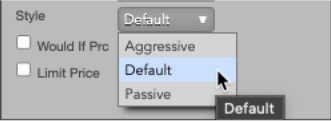
From the TT TWAP Details pane, execution can be set to: Aggressive, Default, or Passive.

Setting a Price Trigger (Would If Price)

From the TT TWAP Details pane:

  1. Select Would If Price by ticking the checkbox.
  2. Specify a price in TT’s Price Display format.
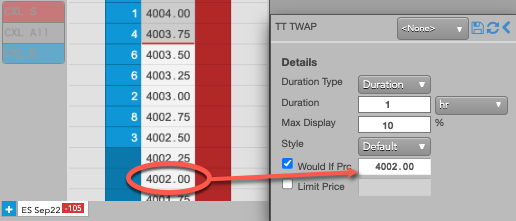
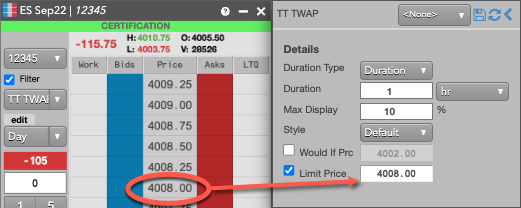
Setting a Price Limit

From the TT TWAP Details pane:

  1. Select Limit Price by ticking the checkbox.
  2. Specify a price in TT’s Price Display format.
This site is registered on wpml.org as a development site. Switch to a production site key to remove this banner.