











From within your TT workspace, care orders can be submitted using the Order Ticket.
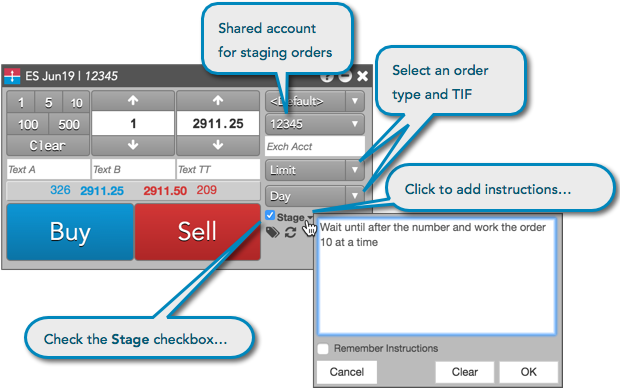
To submit a care order:
-
Open an Order Ticket for a contract.
-
Enter the account, price, quantity, order type, and TIF order restriction.
-
Check the Stage checkbox.
Note: If you submit staged orders on a regular basis, this box can be checked by default if the Staged column is checked for the profile you are using.
-
Optionally, click the drop down arrow next to the Stage checkbox to enter any additional instructions. You can also click Remember Instructions to save the instructions in the Order Details screen.
-
Click Buy or Sell to submit the order.
The order appears in the Order Book with a Status of Available.