


ADL
ADL Overview
ADL Basic Concepts
Description
Reference
Task
Advanced concepts
Case Studies
Description
Task
Building your first algo
Lessons
Introduction to ADL
Description
Reference
Task
Videos
Arithmetic blocks
Basic blocks
Discrete blocks
Group blocks
Jump blocks
Library blocks
Logic blocks
Miscellaneous blocks
Trading Blocks
Virtualized blocks
APIs
TT .NET SDK
Advanced Concepts and Options
Appendix
Creating the application framework
Getting started with TT .NET SDK
Subscribing for market data
More about prices
An in-depth look at the Price class
Working with Algos
Algo Server
TT Order Types
TT Premium Order Types
Working with instruments
Working with orders and fills
Handling trade subscriptions
Working with trade subscriptions
TT CORE SDK
Appendix
Creating a TT Application Server
Creating Application Framework
Getting Started with TT Core SDK
Subscribing for Market Data
Working With Instruments
Working with Orders and Fills
TT REST API 2.0
API Reference
Getting Started
TT REST API 2.0 (UAT)
API Reference
Getting Started
Data and Analytics
TT Margin
MiFID II Support
Monitor
Setup
Company Administration
Account Administrators
Description
Task
Accounts
Description
Reference
Task
Use Cases
Videos
Advanced Features
Description
Company
Description
Reference
Task
Connections
Description
Reference
Task
Videos
Order Tag Defaults
Description
Task
TT Access
Description
Task
TT Premium Services
Description
Task
Users
Description
Reference
Task
Videos
Exchanges: Americas
B3
Description
Task
CBOE
Description
Task
Cboe FX
Description
Reference
Task
CFE
Description
Task
CME
Description
Task
Dealerweb
Description
Task
EBS Direct
Description
Task
EBS Market
Description
Task
Fenics
Description
Task
FMX
Description
Task
FMX_USTF
Description
Task
Goldman Sachs Commodity Blocks (GSCB)
Description
Referece
Task
ICE
Description
Task
MexDer
Description
Task
MIAX_FUT_CH
Description
Task
MIAX_FUT_NY
Description
Task
MX
Description
Task
NFI
Task
Nodal
Description
Task
Exchanges: Asia/Pacific
ABX
Description
Task
ASX
Description
Task
CoinFLEX
Task
FEX
Description
Task
HKEx
Description
Task
JPX
Description
Task
NSE
Description
Task
NZX
Description
Task
SGX
Description
Task
SGX GIFT
Description
Task
TAIFEX
Description
Task
TFEX
Description
Task
TFX
Description
Task
Exchanges: Crypto
Coinbase
Description
Task
Kraken
Description
Task
Exchanges: EMEA
ATHEX
Description
Task
BIST
Description
Task
CEDX
DGCX
Description
Task
EEX
Description
Task
EPEX SPOT
Description
Reference
Task
Eris
Description
Task
Eurex
Description
Task
Videos
Euronext
Description
Task
GFO-X
Description
Task
ICE_L
Description
Task
JSE
Description
Task
LME
Description
Task
LME NTP
Description
Task
LSE
Description
Task
MEFF
Description
Task
NASDAQ_NED
Description
Task
NDAQ_EU
Description
Task
Nord Pool
Description
Reference
Task
WSE
Description
Task
FIX Support
FIX Ruleset
Description
Task
FIX Sessions
Description
Task
Secondary Accounts
Description
Task
Risk Management
KRM Limits
Description
Task
Order Cross Prevention
Description
Task
Videos
Pre-Trade Portfolio Risk
Description
Reference
Task
Risk Administration
Description
Task
Risk Limits
Description
Reference
Task
Videos
Setup Overview
Getting Started
Description
Reference
Task
Videos
Supported Order Types and TIFs
TT® OMS
TT OMS Administration
Description
Reference
Task
Use Cases
Trade
Algo Trading
Algo Dashboard
Description
Reference
Task
Videos
Autotrader
Description
Reference
Task
Videos
Excel integration with TT
Description
Reference
Task
Videos
Market-Making Algos
Order Management Algos (OMAs)
Template Manager
Description
Task
Analytics
Charts
Description
Reference
Task
Technical Indicators
Videos
Trader Analytics
Description
Reference
Task
Basic Order Entry
Blocktrader
Description
Reference
Task
Videos
MD Trader®
Description
Reference
Task
Videos
Order Profiles
Description
Reference
Task
Order Ticket
Description
Reference
Task
Use Cases
Routing Rules
Description
Task
Trading Crypto on TT
Description
Reference
Task
Videos
Trading on B3
TT Order Types
Case Studies
Description
Reference
Task
Videos
TT Premium Order Types
Description
Reference
Task
Options
Counterparty Manager
Description
Task
Electronic Eye
Description
Reference
Task
Videos
Expiration Manager
Description
Task
Options Chain
Description
Reference
Task
Use Cases
Videos
Options on TT
Description
Videos
Options Risk
Description
Reference
Task
Videos
Options Risk Matrix
Description
Reference
Task
Videos
Options Trade Monitor
Description
Reference
Task
Videos
QuikStrike
Description
Task
RFQ Viewer
Description
Reference
Task
Videos
RFQ with Counterparties
Description
Task
Strategy Creation
Description
Reference
Task
Use Cases
TT Uncovered
TT Uncovered 2.0
Description
Task
TT Uncovered 3.0
Description
Task
Vol Curve Manager
Description
Reference
Task
Use Cases
Videos
Volatility Calculator
Description
Task
Watchlist
Description
Reference
Task
Videos
Order Management
Account & User Restrictions
Description
Reference
Task
Account List
Description
Reference
Task
Videos
Alert Manager and Alert Viewer
Description
Reference
Task
Videos
Audit Query
Description
Reference
Task
Audit Trail
Description
Reference
Task
Balances
Description
Reference
Task
Fills
Description
Reference
Task
Floating Order Book
Description
Reference
Task
Order Book
Description
Reference
Task
Orders and Fills
Description
Reference
Task
Position Manager
Description
Reference
Task
Positions
Description
Reference
Task
Overview
Browser Access
Description
Task
Videos
Preferences
Description
TT Desktop
Description
Reference
Task
Videos
TT Platform
Description
Task
Widgets
Description
Task
Workspace Windows
Description
Task
Videos
Spread Trading
Aggregator
Description
Reference
Task
Videos
Autospreader
Description
Reference
Task
Use Cases
Videos
Autospreader Rules
Description
Reference
Task
Videos
Hedge Manager
Description
Reference
Task
Videos
Trading in Yield
Description
Reference
Task
Use Cases
TT® OMS
Bulking
Description
Task
Videos
Care Orders
Description
Reference
Task
Videos
Combining
Description
Task
Lock and Release
Description
Task
Order Exceptions
Description
Task
Order Passing
Description
Task
Use Cases
Stitching and Splitting
Description
Task
Viewing Market Data
Depth
Description
Reference
Task
Market Grid
Description
Reference
Task
Videos
Product Grid
Description
Reference
Task
Spread Matrix
Description
Reference
Task
Videos
Time and Sales
Description
Reference
Task
TT Backtesting
TT FIX Services
TT FIX Drop Copy In
Overview
Supported application messages
TT FIX Drop Copy Out
Compliance Feed messages
Overview
Supported application messages
TT FIX Message Conversations
TT FIX Gateway
Components
FIX Message Structure
Getting Started
Order Gateway Messages
Price Gateway Messages
Session messages
TT FIX General
FIX Message Structure
Getting Started
Session messages
TT FIX Market Data
Overview
Supported application messages
TT FIX message conversations
TT FIX Order Routing
Overview
Supported application messages
TT FIX message conversations
TT FIX Recovery
Compliance Feed Messages
FIX Recovery Methods
Overview
Supported application messages
TT Mobile
TT Trade Surveillance
Cluster View
Configurable Models
Core Models
Cross Product Models
Improperly Matched Trade Models
Market Abuse Models
Market Rate Models
Miscellaneous Models
Spoofing Models
Trading Behaviors Models
Overview
Reference
Reports
Using TT Trade Surveillance
Wachlists

TT If Touched

On this page

An If-Touched is an order that is triggered when the market has reached or traded through a specified price in the market. If-Touched orders are similar to Stop orders except the trigger price behavior is inverted. An If-Touched trigger price is typically set better than the current market.

Buy If-Touched orders are generally placed below the current last traded price while, Sell If-Touched orders are generally placed above the current last traded price.

For more information, refer to the TT If Touched Order section of the Trade help.
TT Stop
TT Stop
TT Stop
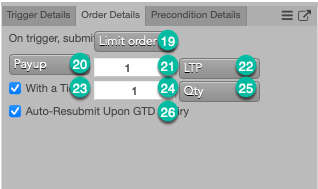
NumberNameFIX TagTypeRequiredUpdatableFieldLocationDescription
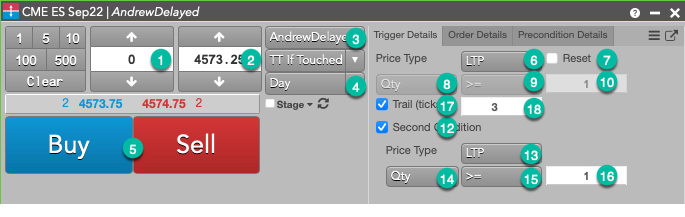
(constructor variable)InstrumentTRUEFALSEOrderProfileInstrument for native child order
1OrderQtyTag 38QuantityTRUETRUEOrderProfileOrder quantity for native child order
5OrderSideTag 54tt_net_sdk.OrderSideTRUEFALSEOrderProfileSide for native child order
3AccountTag 1AccountTRUEFALSEOrderProfileAccount for native child order
19OrderTypeTag 40tt_net_sdk.OrderTypeTRUEFALSEOrderProfileOrder Type for native child order.
4ChildTIFTag 16903tt_net_sdk.TimeInForceTRUEFALSEUserParametersTime in force for native child order
34LimitPriceTag 44PriceFALSETRUEOrderProfileLimit price to be used for native child order
22LimitPriceTypeTag 16911tt_net_sdk.tt_if_touched.LimitPriceTypeFALSETRUEUserParametersIf provided, overrides LimitPrice and sets the native child order price to be LimitPriceType+Payup for buys and LimitPriceType-Payup for sells. (This would be the same as setting Number 20 to “Payup”.)
21PayupTag 16930Int_tFALSETRUEUserParameters
25WithATickTypeTag 16921tt_net_sdk.tt_if_touched.WithATickTypeFALSEFALSEUserParametersIf provided, sets the threshold for the With A Tick behavior that reprices the child order one tick toward the market when available quantity at the opposite inside market is at or below the specified quantity threshold.
24WithATickTag 16922Int_tFALSETRUEUserParameters
2TriggerPriceTag 99PriceFALSETRUEOrderProfileSets the parameters of the primary trigger. If IsTrlTrg=TRUE, the trigger will trail instead of being static so TriggerPrice will be ignored.
6TriggerPriceTypeTag 16918tt_net_sdk.tt_if_touched.TriggerPriceTypeFALSEFALSEUserParameters
17IsTrlTrgTag 16908Boolean_tFALSEFALSEUserParameters
18TriggerTicksAwayTag 16919Int_tFALSETRUEUserParameters
8TriggerQtyTypeTag 16923tt_net_sdk.tt_if_touched.TriggerQtyTypeFALSEFALSEUserParametersIf provided, sets a quantity trigger in addition to the primary price trigger.
9TriggerQtyCompareTag 16924tt_if_touched.TriggerQtyCompareFALSEFALSEUserParameters
10TriggerQtyTag 16925Qty_tFALSETRUEUserParameters
7TriggerLTPResetTag 16926Boolean_tFALSEFALSEUserParameters
12SecondConditionIsOnTag 16966Boolean_tFALSEFALSEUserParametersIf provided, sets a secondary quantity trigger.
13SecondTriggerPriceTypeTag 16972tt_net_sdk.tt_if_touched.SecondTriggerPriceTypeFALSEFALSEUserParameters
14SecondTriggerQtyTypeTag 16968tt_net_sdk.tt_if_touched.SecondTriggerQtyTypeFALSEFALSEUserParameters
15SecondTriggerQtyCompareTag 16969tt_net_sdk.tt_if_touched.SecondTriggerQtyCompareFALSEFALSEUserParameters
16SecondTriggerQtyTag 16970Qty_tFALSETRUEUserParameters
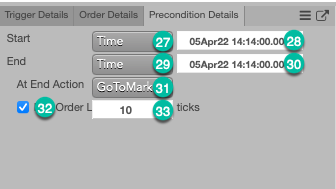
27WaitingOptionTag 16961tt_net_sdk.tt_if_touched.WaitingOptionTRUEFALSEUserParametersDictates when to start the parent synthetic order.
28STimeTag 168UTCTimestamp_tFALSETRUEUserParametersIf WaitingOption is set to Time, this parameter defines the start date/time.
29ParentTIFTag 16950tt_net_sdk.tt_if_touched.ParentTIFTRUEFALSEUserParametersTime in force for parent synthetic order
30ETimeTag 126UTCTimestamp_tFALSETRUEUserParametersIf ParentTIF is set to Time, ETime defines the end date/time and ETimeAct defines the end time action. If the ETimeAction is set to GoToMarket and ETAGoToMktTicksEnabled is set to True, then ETAGoToMktTicks defines the number of ticks through the market that a limit order will be submitted through market.
31ETimeActTag 16906tt_net_sdk.tt_if_touched.ETimeActFALSEFALSEUserParameters
32ETAGoToMktTicksEnabledBoolean_tFALSETRUEUserParameters
33ETAGoToMktTicksTag 16960Int_tFALSETRUEUserParameters
26AutoResubExpiredGTDTag 16949Boolean_tFALSEFALSEUserParametersIf set to True and ChildTIF is set to GTD, the child order will be resubmitted when the market reopens if the current session closes and there is still unfilled quantity.
This site is registered on wpml.org as a development site. Switch to a production site key to remove this banner.