






What is a TT Order Type?
A TT Order Type order is a synthetic order that manages the submission and execution of other orders in the market. TT Order Types provide more robust order execution functionality than exchanges support natively. They offer order types not supported by exchanges or provide more options than exchange-native order types provide. TT Order Types offer the following features:
- Slicing large quantity orders into several smaller-quantity orders
- Entering orders in response to specific market conditions
- Scheduling orders to begin or end at a specific time
- Repricing orders based on desired market conditions
A TT Order Type order comprises two parts:
- A synthetic parent order that runs on an Algo Server co-located with the exchange on which the instrument trades. The parent order manages the entry and execution of its child orders.
- Native child orders that are sent to an exchange for order execution based on the selected TT Order Type and its configuration parameters.
Available TT Order Types
The following table list all order types available on the TT platform. However, the User Account Permissions in TT User Setup determines the actual order types shown in order entry widgets.
| TT Order Type | Description |
|---|---|
|
Available with Standard License |
|
| TT Bracket | Submits a Limit or Stop order that, upon execution, triggers an OCO (one-cancels-other) order |
| TT Iceberg | Executes a large volume order by breaking it into smaller disclosed orders, submitting them one at a time until the total order quantity if filled. The next child order is entered only after the current child order is fully-filled. |
| TT If-Touched | Triggers an order when the market has reached or penetrated a specified price better than the current market. |
| TT OCO | Submits two orders of the same quantity at different price levels on the same side of the market, cancel one as the other is filled. |
| TT Retry | Continues to submit the child order until it is accepted by the exchange or until it is rejected a specified number of times. |
| TT Stop | Triggers an order when the market has reached or penetrated a price worse than the current market. |
| TT Time Duration | Works a large quantity order for a set period of time, submitting smaller disclosed order portions at regular intervals based on a total time desired to achieve the total goal quantity. |
| TT Time Sliced | Slices a large quantity order into smaller disclosed orders and submits them at fixed time intervals. |
| TT Timed | Submits an order at a specific time and works the order until a specified time is reached. |
| TT Trailing Limit | Submits an order to the exchange at a specified number of ticks away from the market. |
| TT Time Weighed Average Price (TWAP) | Slices a large order quantity into smaller disclosed orders and submits them at uniform time intervals to keep the executed trade price as close as possible to the average market price without alerting other market participants to order volume. |
| TT Volume Duration | Submits an order based on the total amount of traded volume needed to achieve the total order quantity. |
| TT Volume Sliced | Slices a large quantity order into smaller disclosed orders based on trading volume. |
| TT With A Tick | Submits a limit order that that is automatically repriced one tick towards the market based on the price and quantity of the opposite inside market. |
| TT Autohedger | Automatically submits an underlying hedge order for a filled options outright or spread/strategy order |
| TT OBV | Enters an order for an options contract by based on a desired volatility. |
| TT Sniper (OTA) | TT Sniper is an Order Ticket Algo (OTA) that allows you to hide your intent to buy or sell at a given price until there is quantity available at that price on the opposite side of the market. |
|
Available with TT Pro License Note: A TT Pro License gives you access to TT’s suite of automated spreading trading tools, TT’s algorithmic trading tools, and the following order types. |
|
| TT Multi-Level Bracket (OTA) | TT Multi-Level Bracket is an Order Ticket Algo (OTA) that allows you to take a position in an instrument and exit at one or more prices. |
| BrackeTT (OTA) | BrackeTT is an Order Ticket Algo (OTA) that is a simplified version of the TT Bracket order type. When launched, BrackeTT submits a Limit order which, upon being filled, submits additional orders that synthesize the logic of an OCO (one-cancels-other) order. |
| OCO (OMA) | The OCO OMA lets you adopt two or more working orders in the Order Book and apply an OCO (one-cancels-other) OMA (Order Management Algo) to them. When one order is fully-filled, the other orders are canceled. Also, when partial fills are received for one order, the quantities of the other orders are reduced accordingly. |
| OCO 2 (OMA) | The OCO 2 OMA lets you select two orders and apply an OCO (one-cancels-other) OMA to them. When one order is fully-filled, the other order is canceled. Also, when partial fills are received for one order, the quantity of the other order is reduced accordingly. |
| Conditional (OMA) | Submits one order as the trigger condition (primary order) for working a second order (conditional order). The primary order immediate enters the market while the second order remains on hold. When the primary order receives fills, the conditional order enters the market. |
| MinVol (OMA) | The MinVol OMA is an Order Management Algo (OMA) that lets you specify a minimum quantity required at a price level to work an exchange order. The algo will cancel the order if the volume drops below the minimum quantity. If the volume builds back up to the required quantity, the algo will re-submit the order. You can also specify the maximum number of times the algo will submit an exchange order. |
| With A Tick (OMA) | The With A Tick OMA gives you the ability to apply With A Tick (WAT) logic to a working order using either the Order Book or Floating Order Book widget. The WAT logic automatically reprices the order one tick towards the market based on the price and quantity of the opposite inside market. |
| Direct Entry (MMA) | Direct Entry is a type of Market-Making Algo. A direct entry order type submits the quoting orders based on the direct price supplied in the Bid Prc and Ask Prc inputs. The working orders will automatically reprice based on any changes to the supplied bid/ask price values. |
| Single Theo (MMA) | Single Theo is a type of Market-Making Algo. A single theo order type submits the quoting orders a user-defined number of ticks (Bid Offset and Ask Offset) from a single theoretical price (Theo Price). The working orders will automatically reprice based on any changes to the supplied theoretical value or offsets. |
| Bid/Ask Theo (MMA) | The Bid/Ask Theo is a type of Market-Making Algo. A single theo order type submits the quoting orders a user-defined number of ticks (Bid Offset and Ask Offset) from a theoretical bid/ask price (Theo Bid and Theo Ask). The working orders will automatically reprice based on any changes to the supplied theoretical values or offsets. |
| Market Base (MMA) | The Market Base order type is a type of Market-Making Algo. A market base order type submits the quoting orders a user-defined number of ticks (Bid Offset and Ask Offset) from the current inside market of the quoted instrument. The working orders will automatically reprice based on the movement of the market or changes to the offsets. |
| Reference Base (MMA) | The Reference Base order type is a type of Market-Making Algo. A market base order type submits the quoting orders a user-defined number of ticks (Bid Offset and Ask Offset) from the current inside market of the reference instrument (Ref Instrument). The working orders will automatically reprice based on the movement of the reference market or changes to the offsets. |
TT Order Type order lifecycle
The basic lifecycle for a TT Order Type order is as follows:
- When creating an order, a TT Order Type is selected within an order-entry widget and its parameter values are specified in the order type fly-out.
- A TT Order Type order is submitted from the TT platform.
- A synthetic parent order is created for the TT Order Type on an Algo Server co-located with the exchange.
-
The synthetic parent order submits child orders to the market as dictated by the specific TT Order Type.
In the Order Book, the parent synthetic order is listed, followed by
each of the child orders it sumbitted. In this example, the Order Book shows the parent TT Time Sliced order and
the exchange-native child orders it manages.
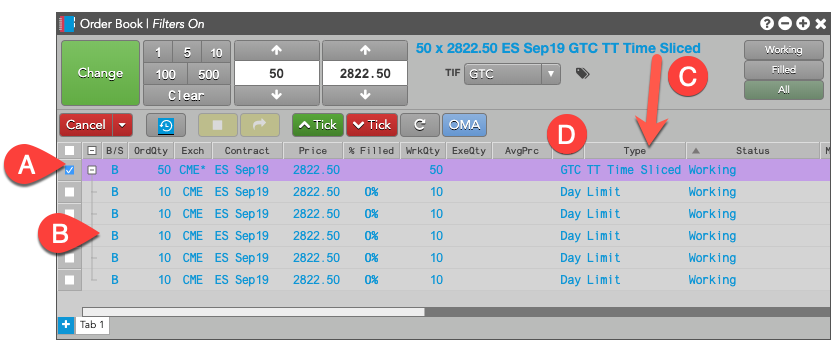
- A: TT Time Sliced synthetic parent order. Notice the Exch column shows CME*, which indicates the parent order is running on an Algo Server co-located with the CME exchange.
- B: Child orders managed by the TT Time Sliced synthetic parent order, along with the order type and status for each child order.
- C: The Type of the parent order matches the name of the specified TT Order Type.
- D: By default, a TT Order Type parent is submitted with TIF=GTC.
-
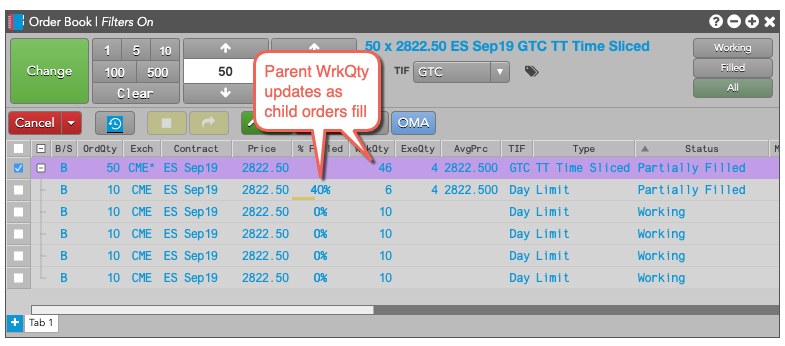
As fills for the child orders are received, the parent order updates its working and filled quantities.
-
It also sends the fill acknowledgments back to TT to order entry and order management widgets, such as MD Trader and Audit Trail.
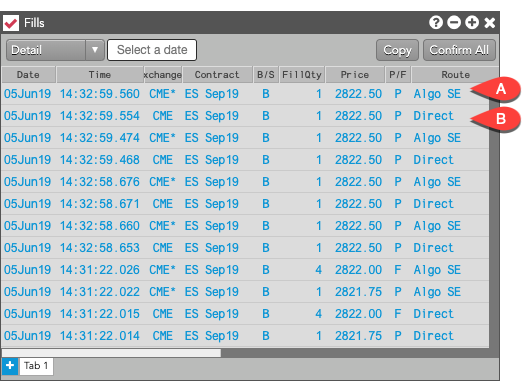
- A. Parent order fill
- B. Child order fill
- When all of the child orders have finished working, the parent TT Order Type order is fully-filled and is removed from the Algo Server.
Accessing TT Order Types
You can access TT Order Types in two ways: you can select a TT Order Type from the Order Type drop-down in the MD Trader or Order Ticket widgets.


Configuring TT Order Type orders
Each TT Order Type displays a fly-out with its associated parameters when selected as the order type. You can enter the desired parameter values as well as save them as re-usable templates.
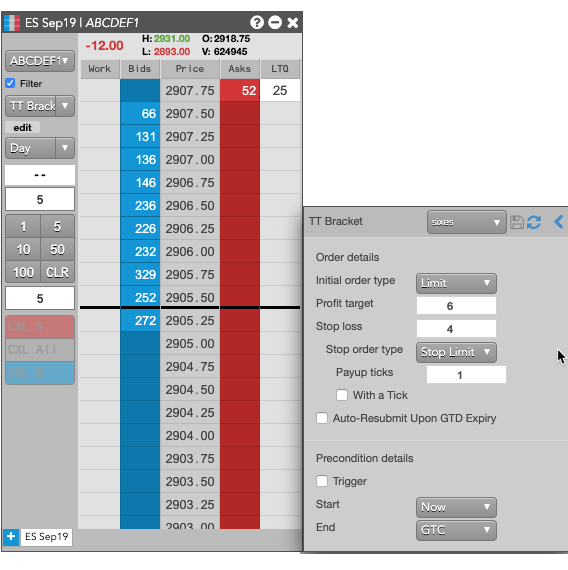
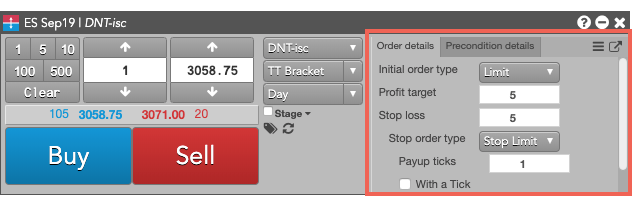
When using the Order Ticket, the parameters are displayed in an embedded panel. Based on the TT Order type, the panel might include tabs for additional parameters. For example, the following shows a fly-out dialog for a TT Bracket order type.
Note: You can click  to display the available
templates and
to display the available
templates and  to
display all of the parameters in a flyout.
to
display all of the parameters in a flyout.
Placing a TT Order Type order
To enter a TT Order Type order:
- In the MD Trader® or Order Ticket widget, choose the contract to trade.
- Enter the desired order quantity and price for the order.
- Select the desired TT Order Type from the order type drop-down.

- Enter the desired child order parameters.
- Specify the desired parent order parameters.
- Click OK to close the parameters dialog.
- Specify the TIF for the exchange-native child orders submitted by the TT Order Type parent order. Note: If you specify a TIF (time-in-force) for the child orders that the exchange does not support, the parent order will be immediately rejected instead of when the first child order is submitted.
-
Click Buy or Sell to submit the order.
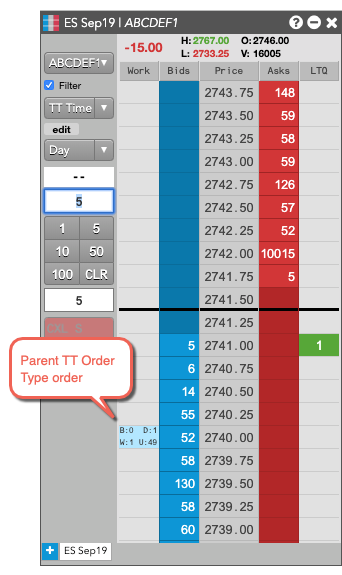
The parent order is added to the widget.
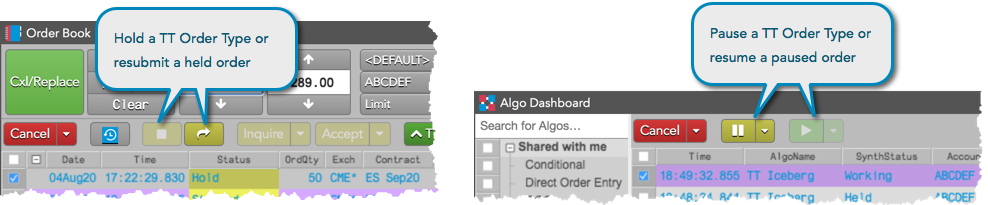
Held and paused TT Order Type orders
When submitting a TT Order Type order, you can:
- Submit the order as a held order and then resubmit it at a later time.
- Pause/resume the TT Order Type order after it is working in the market.
TT Order Type orders can be submitted as held orders using MD Trader and the Order Ticket, and can be resubmitted later using the Order Book widget. When working in the market, TT Order Type parent orders can be paused and resumed using the Order Book or Algo Dashboard widget.
Changes to held and paused TT Order Type orders
The Order Book uses “Cancel/Replace” instead of “Change” after modifications to paused TT Order Types. This ensures that all values on the paused parent order are correctly applied to the new order, which is submitted “on hold” after the paused order is canceled.
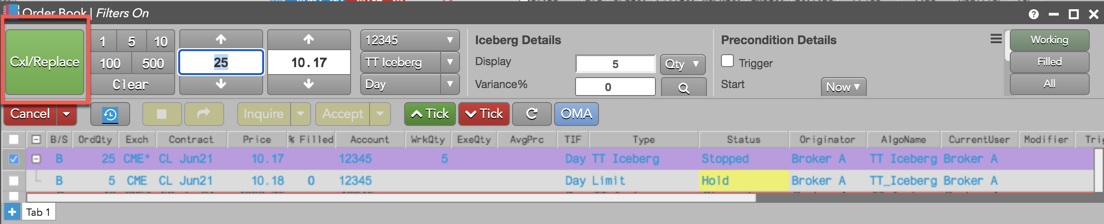
Held TT Order Type orders can be modified before being resubmitted. When modifying and resubmitting a held TT Order Type, consider the following:
- TT Bracket and TT OCO — Changes to the quantity are allowed and the order resumes at its original price.
- TT Iceberg — Changes to quantity are allowed.
- TT If Touched — Changes to price and quantity are allowed.
- TT Stop — Changes to price and quantity are allowed.
Note: Changes to all other held/paused TT Order Type orders are not allowed.